

Our Top Picks
On a UK budget of 300 pounds, a Chromebook is usually a better bet than a Windows laptop, and the twelve 11.6-inch models below show what that money looks like on US listings, with the Acer Chromebook 311 and the Lenovo 500e as the strongest picks by specification. This guide gives no conversions and no prices. Expect 4GB of RAM, 32GB to 64GB of storage and a basic HD screen. Several units are renewed, so we flag condition, and we explain how to check how long Google will keep each model updated.
Twelve Chromebooks side by side
As an Amazon Associate we earn from qualifying purchases at no extra cost to you.






| Model | Key point from title | Price tier | Best for |
|---|---|---|---|
| Dell Chromebook 11 3100 | Celeron N4020, 4GB, 16GB flash, US keyboard | Budget | Cheapest school-style use |
| Samsung Chromebook 4 XE310XBA | N4000, 4GB, 32GB eMMC, Gigabit Wi-Fi | Mid-range | Reliable basics |
| ASUS Chromebook CR11 CR1104CGA | N100, 4GB, 64GB, spill-resistant | Mid-range | Rough handling |
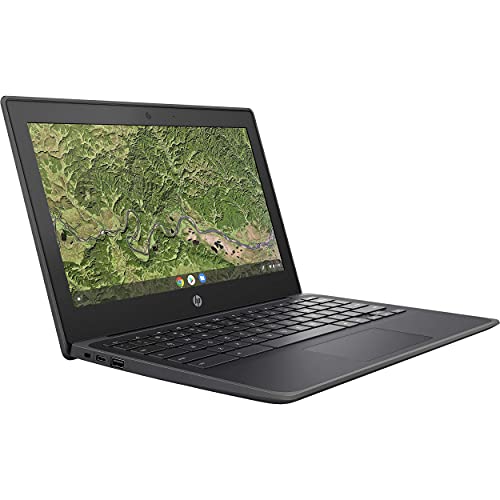
| acer Chromebook 311 CBOA311-1H | N4500, 4GB LPDDR4X, 64GB | Mid-range | Everyday web and email |
| HP Chromebook 11A G8 EE | AMD A4-9120C, 4GB, 32GB, renewed | Budget | Low-cost school spare |
| Lenovo 300e 81H0 | MediaTek M8173C, touch 2-in-1, renewed | Budget | Tablet-style use |
| acer 311 Chromebook Flagship | N4500, 4GB, 64GB, Wi-Fi 5, 8+ hours | Mid-range | Battery-focused budget |
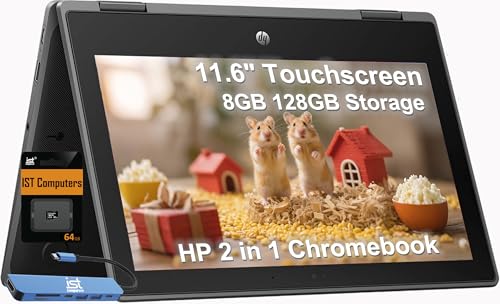
| HP Chromebook Pro X360 Fortis | 8GB, 128GB (64 eMMC + 64 SD), rugged | Premium | Best specification |
| HP Chromebook 11 G9 EE | N4500, 4GB, 32GB, renewed | Budget | Newer renewed pick |
| HP Chromebook 11A NB0013DX | Celeron N3350, 4GB LPDDR2, 32GB | Mid-range | Weak value |
| Lenovo 500e Gen 4s | N150, 8GB, 64GB, touchscreen | Premium | Most future-proof |
| ASUS Chromebook C203XA | MediaTek, 4GB, 32GB, MIL-STD 810G | Premium | Durable, older |
The Chromebooks, one at a time
Dell Chromebook 11 3100 (Renewed)
The title lists an N4020, 4GB, only 16GB of flash storage, an 11.6-inch 1366 x 768 screen and an English (US) keyboard. It is renewed, so condition varies, and a student-grade unit may have been used heavily. Ask for the condition grade.
Pros
- Lowest cost tier
- Compact 11.6-inch size
Cons
- 16GB storage is very small
- Renewed, battery wear possible
Who it’s for: Children or very light web use.
Samsung Chromebook 4 (XE310XBA)
This one lists an N4000, 4GB, 32GB eMMC and gigabit Wi-Fi in an 11.6-inch HD body. The model number points to an older platform, so verify the update date before buying. Gigabit Wi-Fi only helps if your router supports it.
Pros
- Recognisable brand
- Gigabit Wi-Fi named
Cons
- Older N4000 platform
- Update window may be short
Who it’s for: Shoppers who want a plain brand-name Chromebook.
ASUS Chromebook CR11 (ruggedized)
The title lists an Intel N100, 4GB, 64GB eMMC, a ruggedized build, an antimicrobial guard and a spill-resistant keyboard. The N100 is a newer processor name than most here. A ruggedized build is meant for knocks, though the listing does not give a test rating we can quote.
Pros
- Newer processor name
- Spill-resistant keyboard
Cons
- Rugged body adds bulk
- Only 4GB RAM
Who it’s for: Families and school bags.
acer Chromebook 311 (C90F)
The title lists a dual-core N4500, 4GB LPDDR4X, 64GB eMMC and an 11.6-inch HD display with Bluetooth and Wi-Fi. It balances storage and processor at a middle tier, and it sits well for students who want a plain, supported design.
Pros
- 64GB storage
- N4500 processor named
Cons
- HD resolution only
- Plastic build is typical of the class
Who it’s for: Students on a modest budget.
HP Chromebook 11A G8 Education (Renewed)
This education model lists an AMD A4-9120C, 4GB DDR4, 32GB eMMC, an 11.6-inch WLED screen and a webcam. As a renewed item, check the grade and check the update date, because education models are often older. Education editions may also be tied to a school management setup, so check the listing.
Pros
- Very low cost tier
- Webcam listed
Cons
- Older platform
- Renewed condition varies
Who it’s for: Buyers who treat it as a spare.
Lenovo 300e Chromebook 2-in-1 (Renewed)
A 2-in-1 with an 11.6-inch touchscreen, MediaTek M8173C, 4GB and 32GB flash. It folds into a tablet, which suits reading, though the processor is an older MediaTek design. The tablet mode lets you read or watch video without the keyboard in the way.
Pros
- Touchscreen 2-in-1
- Low cost tier
Cons
- Older processor
- Renewed, with unclear update date
Who it’s for: Casual reading and video.
acer 311 Chromebook Flagship (N4500)
The title lists an N4500, 4GB, 64GB, Wi-Fi 5, a webcam and 8+ hours of battery, plus an accessory. The battery figure is a seller claim; the accessory is not a laptop spec. Compare it with the plain acer 311 above before choosing the one with extras.
Pros
- Larger 64GB storage
- Battery claim stated
Cons
- Spec matches the other acer 311
- Accessory adds nothing to the laptop
Who it’s for: Buyers comparing it with the other 311.
HP Chromebook Pro X360 Fortis
This 2-in-1 lists an Intel CPU (model unnamed), 8GB, 128GB split between 64GB eMMC and a 64GB SD card, a touchscreen and a spill-resistant rugged build. The card is removable, so it is not the same as internal storage. It could be useful for offline files, but do not count on it for apps.
Pros
- 8GB RAM and a touchscreen
- Rugged, spill-resistant
Cons
- CPU model not named
- Highest cost tier
Who it’s for: Users who want the most capable listing.
HP Chromebook 11 G9 EE (Renewed)
A dual-core N4500, 4GB and 32GB flash in an 11.6-inch HD body, marked renewed. The N4500 is a newer chip than many renewed rivals, which may mean a longer update window. Confirm that with Google’s policy page, not by guessing.
Pros
- Newer chip for a renewed unit
- Low-to-middle cost
Cons
- Renewed condition varies
- 32GB storage
Who it’s for: Budget buyers who want a newer renewed model.
HP Flagship Chromebook 11A-NB0013DX
The title lists an N3350, 4GB LPDDR2, 32GB eMMC and HD Graphics 500. LPDDR2 and the N3350 point to an older generation, so treat the update window as a priority check. At this tier you could do better with a newer chip.
Pros
- HP brand
- Light 11.6-inch body
Cons
- Older platform
- Mid-range tier for dated hardware
Who it’s for: Only if the update date is acceptable.
Lenovo 500e Chromebook Gen 4s
The title lists an Intel N150, 8GB, 64GB flash, a touchscreen and an HD 60Hz 11.6-inch panel with an English keyboard. It has the newest processor name and the most RAM tied for the set. The listing includes an English keyboard, and the 60Hz label is standard for this class.
Pros
- N150 and 8GB RAM
- Touchscreen
Cons
- HD resolution only
- Highest cost tier
Who it’s for: Longer-term buyers.
ASUS Chromebook C203XA (rugged)
The title lists a MediaTek quad-core, 4GB, 32GB eMMC, a 180-degree hinge, a spill-resistant keyboard and MIL-STD 810G durability. The durability claim is the seller’s, and the platform is older. Hinge, rugged shell and keyboard design suit shared classroom use more than a personal laptop.
Pros
- Rugged, with a 180-degree hinge
- Spill-resistant keyboard
Cons
- Older MediaTek platform
- Premium tier for the spec
Who it’s for: Heavy-use classroom settings.
How the twelve were chosen
We drew on published specifications, manufacturer documentation and buyer reviews, and stuck to title facts. Every pick is an 11.6-inch Chrome OS laptop, because Windows laptops in the same budget tend to carry weaker specifications; if you need Windows, read our guide to laptops for students under $500 instead. Nobody on the team used or measured these units. Durability, battery and speed statements are the seller’s wording, and price tiers are relative to this set. We show no figures, because the cost for a UK buyer depends on shipping, tax and the exchange rate.
What to check before buying a budget laptop
Update support first
Google sets an automatic update expiration date for each Chromebook model. After that date the device stops receiving updates, which is a security and app-compatibility risk. Look up the model on Google’s policy page, and be cautious with older renewed units.
Support-window sum
Use this sum: expiry year minus the current year gives the years left. As an illustration only, a model expiring in two years has about 24 months of life; at the same cost, a model with five years left costs less per year. Replace the example numbers with the real ones for each model, and add the likely wear of a renewed unit, since an older renewed laptop starts with fewer years left than a new one.
RAM and storage
4GB is workable for browsing but tight with many tabs. 16GB of flash, as on the Dell, is too small for local files. Prefer 64GB where possible, and treat an SD card as extra space. Chrome OS keeps most files online, but offline use needs room.
Screen and body
All twelve have 11.6-inch HD panels. Rugged builds help with children, while touch models suit tablet use. Low-resolution screens look soft for long reading sessions.
Keyboard, plug and warranty
US listings usually carry a US keyboard, so the pound sign sits elsewhere. Check the charger label for its voltage range, and use a suitable plug adapter for UK Type G sockets. A US warranty may not apply in the UK, and renewed items follow the seller’s terms. Keep the invoice and any grade description. Ask the seller whether returns from the UK are accepted and who pays for postage, because the answer decides how much risk you carry.
Mistakes buyers make
The biggest mistake is ignoring the update date. Another is picking 16GB storage and then running out of space within weeks. Some buyers also compare processor names across brands without noticing that the platform generations differ widely. Buyers also expect Windows apps on Chrome OS; they will need web or Android alternatives. Some trust unverified battery claims, or assume a rugged label means it has been certified for their use. Others overlook that a renewed laptop can have a worn battery. Finally, many forget the keyboard layout and plug until the parcel arrives, and that ties up money until an adapter is found.
Verdict
The Lenovo 500e is the strongest overall, with 8GB and a newer processor name, while the acer Chromebook 311 with 64GB is the best-balanced mid-tier choice. The ASUS CR11 suits rough handling, and the HP Fortis is the pick if you want the most RAM and a touchscreen and accept the highest tier. Choose a renewed unit only after checking its update date and return window. Confirm UK delivery, plug and warranty before ordering.
Related guides
- Affordable Gaming Mouse For Alienware Laptop
- Laptop Docking Stations For Dual Monitors
- Travel Backpack With Laptop Compartment
Frequently asked questions
Is a Chromebook good enough for under 300 pounds?
For web browsing, email, documents, video and school work, yes. A Chromebook also starts quickly and needs little maintenance. It will not run full Windows programs, so check that the apps you need run online or as Android apps before you buy. Android app support depends on the model, so confirm it on the listing.
How do I find a Chromebook’s update end date?
Look up the exact model on Google’s Chromebook auto update expiration page. The date applies to the model, not to the individual unit. Renewed laptops are often older models, so check the date before ordering, and prefer models with several years left. Treat any seller who cannot name the model clearly as a warning sign.
Will a US Chromebook work in the UK?
Yes. The software and Wi-Fi work normally. The differences are the plug, the keyboard layout and the warranty. Use the right adapter or cable for UK sockets, check the charger label, and ask the seller about UK warranty and delivery. Also confirm that the seller ships to the UK at all, since some listings do not.
Is 4GB of RAM enough?
For light use, such as a few browser tabs and a document, 4GB is workable. With many tabs or video calls it feels tight. The Lenovo 500e and the HP Fortis offer 8GB, which suits longer-term use. Chrome OS manages memory fairly lightly, but extra RAM still helps with many tabs.
Should I buy a renewed Chromebook?
It can save money, but check the condition grade, the return window and the update date. Battery wear is the usual weak point. For a child’s first laptop, a clear return policy matters more than the lowest cost, because a battery fault may only appear after a few weeks of daily use.

Write Your Review
No reviews yet. Be the first to share your experience!